
What if you can't read
Farsi in Internet Explorer 5 or above?
(Specially in web mails such as Yahoo and Hotmail)
It is a very common problem is Internet Explorer 5 and above that even though your browser supports Farsi, yet you can not read some Farsi pages, specially Farsi e-mails sent to your Yahoo or Hotmail account. Follow these steps Every time the problem occurs and you can read Farsi:
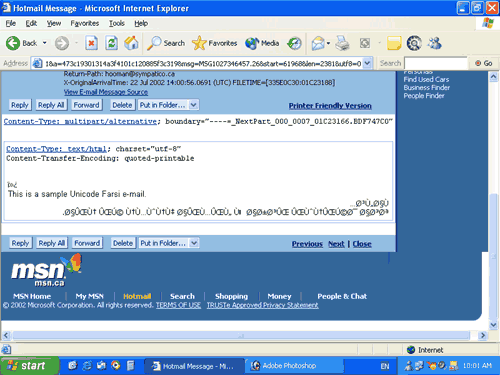
1.This is a sample Farsi mail send to a Hotmail account. As you can see the letters don't show up correctly.

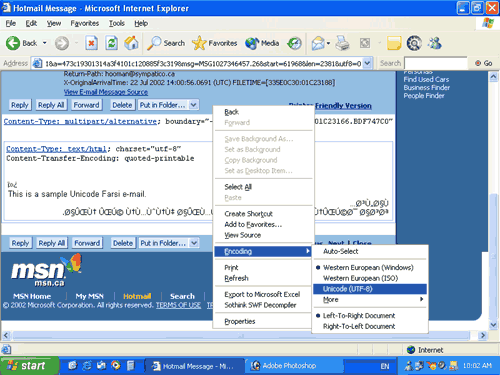
2.Right-click on screen, go to "Encoding" and choose "Unicode (UTF-8)"

3.You should be able to read Farsi, if not go back and see how you should setup your browser.

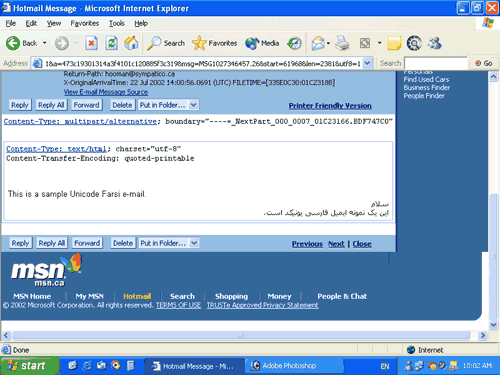
سیستم شما حالا میتواند این صفحهٔ فارسی را بخواند.